Planner Release Notes V3.0
📤 Common Integration Improvements
Planner 3.0 includes integration improvements across most imports/exports, so let's start with some of the changes common to most imports.
In Planner 3.0 you can instantly review import details by providing a way to quickly copy asset names or warnings from import previews:
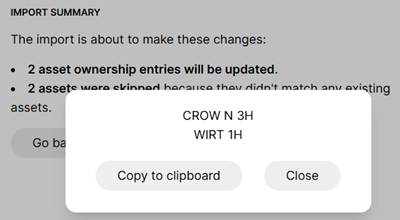
For example, if you run into a warning while trying to import a list of wells, you can now copy that list out of the Planner to check against the source. If you have warnings on any of your ARIES forecast lines (more on this below!) then you can copy the warnings out to review in ARIES.
🐐 Import ARIES Economic Lines
Planner 3.0 is able to import decline/ratio parameters, shrink, and ownership directly from ARIES economic lines:
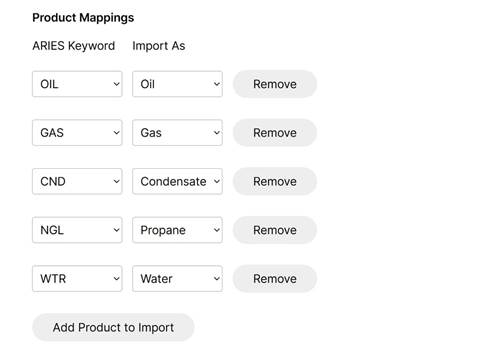
One of the biggest bottlenecks people often run into in planning workflows is simply moving forecasts between tools. Planner 3.0 expands the ARIES integration to make it easier for people to focus on planning and less on data manipulation. This means that you don't need to run ARIES ahead of time and export monthly forecasts. Instead it can read your economic lines directly and import ARIES expressions into the Planner.
"What if my PUDs use lookup tables in ARIES?" This is extremely common and it's why the Planner is also able to use ARIES lookup tables, sidefiles, @macros, common lines, default lines, along with the exact project and input settings that you're using. This ARIES integration builds on top of the same advanced ARIES reader used in Pod2 Validator, so it's able to handle a huge range of keywords and expressions.
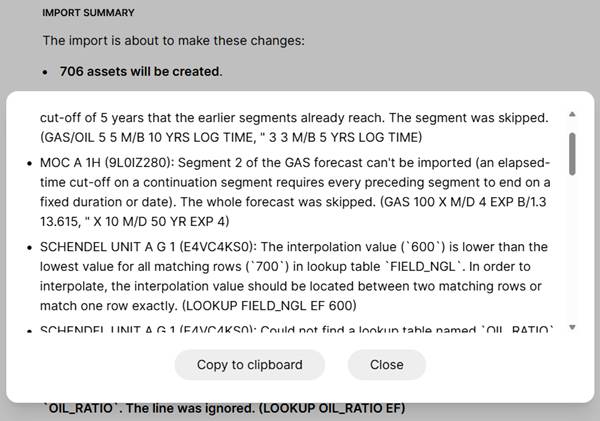
The Planner will warn you about any potential issues during the import, and you can easily copy these out:
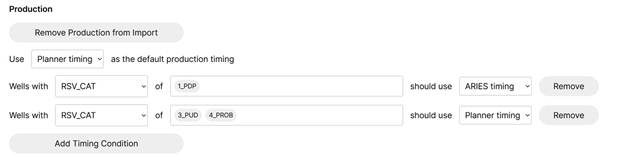
You can also choose which unique identifier you want to use for imports (e.g., if you don't want to use PROPNUM), which asset template to apply based on well attributes, and how production timing should be applied:
🐕 ComboCurve Improvements
The ComboCurve integration has been upgraded in Planner 3.0:
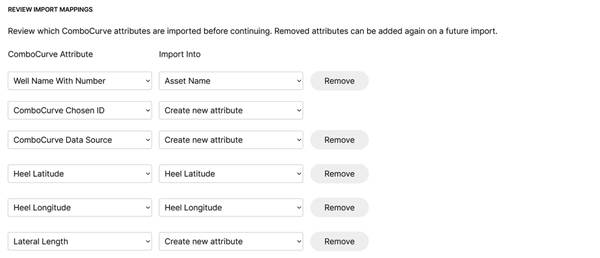
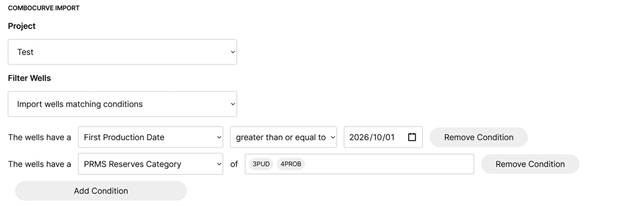
The ComboCurve integration now includes a progress window to show each step of the import (really useful for large imports when downloading from ComboCurve can take some time), an option to choose which attribute to use as unique identifier, support for more built-in ComboCurve attributes, displaying custom field names, and more flexible filters:
🚦 Readiness and Greenlight Import
Readiness functionality in the Planner is now out of early access, so it's not hidden by default anymore in Planner 3.0. Readiness visuals can be accessed by selecting "Display" on the Schedule tab, then showing milestones or phases:
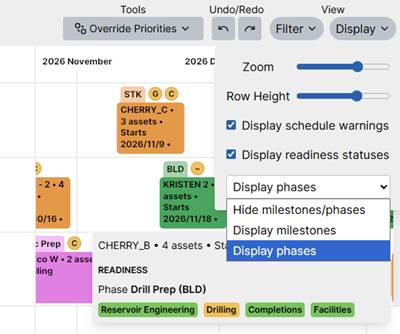
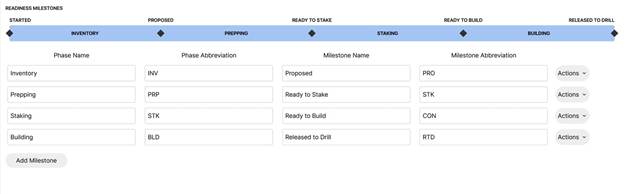
To align with Pod2 Greenlight, Planner 3.0 can also directly import any Greenlight exports. The readiness milestones visualization has also been updated to match Greenlight and better reflect the way wells proceed through milestones and phases:
📤 Parquet Performance
The Parquet export is now faster than ever in Planner 3.0. Previously Parquet exports could slow down when memory or data transfer speeds become a bottleneck on some computers. The new version of the Planner tries to deal with both of these by reducing overhead as much as possible, which should greatly improve performance for anyone running into these limits.
📊 Excel Import/Export Changes
Planner 3.0 adds several new Excel imports and exports.
The first addition is an option to import schedules/activities, which allows you to change activities in bulk.
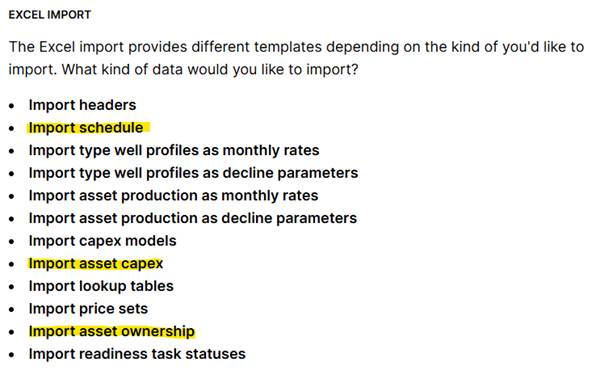
You can export existing activities to Excel, make changes, and import them back in using the same format. This also enables you to quickly import overrides for activities, or switch timing back to automatic.

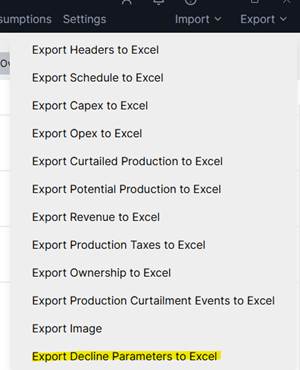
Another new Excel option allows you to export forecast parameters for rates or ratios. Just like the schedule import, you can use this export to make changes in bulk by exporting and re-importing with the same format.
In Planner 3.0 you can also import asset ownership and reversions (more on this below). This works similar to the existing header import that allows you to set the initial ownership, but this import supports multiple reversion points.

Also new to Planner 3.0 is the ability to import and export asset-specific capex (more on this below). Like the schedule import, you can quickly export asset capex, make changes in bulk, and import it back in. This can be useful for overrides when assets move off of a capex model.

🏁 Fastest Calculations Ever
I know we talk a lot about speed improvements, but we're going to keep doing it! The reality is that there a huge number of decisions and changes that go into making a plan. If you can't tell if a change is good or bad, then you're potentially leaving all kinds of value on the table. That's why real-time feedback is so important, and that's only possible when your schedule and economics calculate instantly. That's why the Planner times its calculations in milliseconds instead of minutes.
Planner 3.0 contains a calculation that is faster than ever before. This is especially noticeable in interactions with the new accelerated rendering mode, where the time from a drag and drop interaction to seeing how it affects your schedule is drastically reduced.
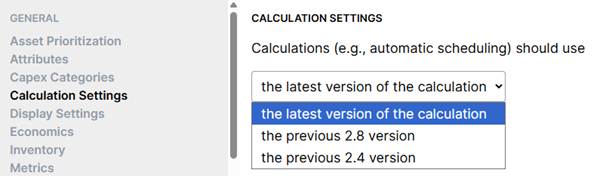
Planner 3.0 also includes an upgrade to the scheduling logic used in the calculation. This is opt-in to allow people time to switch over to the improved calculation once they're ready, at which point their schedule timing could change slightly (because of the improvements).
Besides the performance-related changes, the remaining changes to the schedule calculation are mostly focused on finding better schedules given the same inputs. For example, finding ways to improve cycle times while still honoring the asset prioritization that you specified. You can opt-in to the scheduling changes under "Calculation Settings":
▶️ Accelerated Visualization
A new "Accelerated" schedule visualization mode is available in Planner 3.0. This visualization mode makes better use of the graphics processing unit (GPU) that's included with typical computers to make the schedule visualization and interactions faster.
As part of this change, it also opens the visualization up to other improvements (like animations) which would've been much slower to display without this mode.
Both the new mode and animations can be enabled through "Display Settings" under "Renderer":
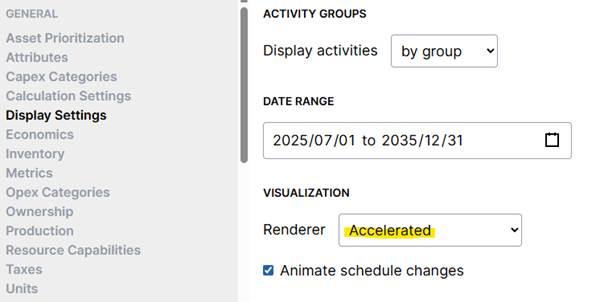
This new mode is opt-in while we gather feedback about any possible issues with graphics hardware. In the future this mode will become the default, so please let us know if you run into any problems using it.
📈 Production Forecasting Enhancements
Besides the decline export, Planner 3.0 adds a number of other production-related improvements.
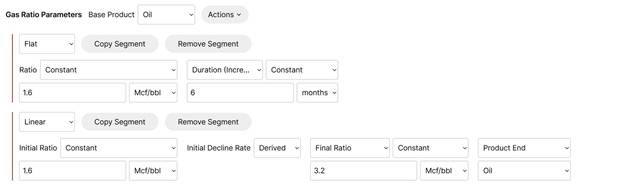
The first is the ability to tie ratio segment end conditions to the life of other products (e.g., a gas ratio ends when the oil rate decline ends). This is used heavily in ARIES and other tools so this will make it much easier to bring forecasts over directly, without having to hand-calculate a cut-off.
Also new in Planner 3.0 is the option to derive initial decline rates from a combination of two cut-offs. This can be really useful for modeling ramp-up segments where you might want to provide initial rate, final rate, and duration instead of the decline rate. The screenshot below shows both being used together to determine the initial decline rate for a ratio segment:
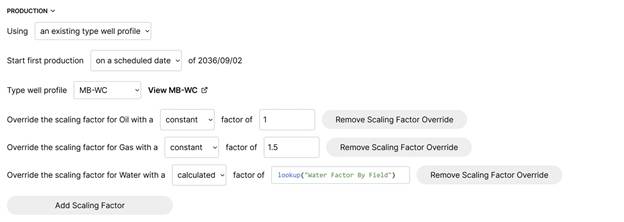
You can also use different scaling factors per product in Planner 3.0:
👆 Schedule Multi-select
You can select multiple activities or groups simultaneously in Planner 3.0:
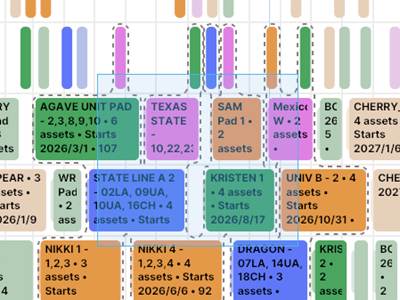
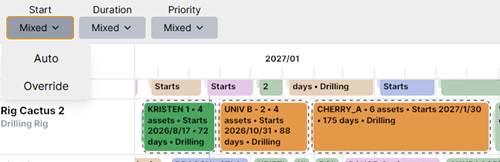
This is extremely useful because you can easily move an entire selection of pads through time or onto another resource. You can also use it to switch timing or durations back to "Auto" across a selection:
As part of this change, there is a new "Select Activities" tool available that you can use to select activities/groups one at a time:
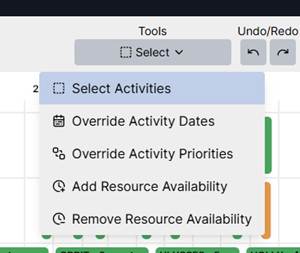
You can hold Shift to add more activities into an existing selection, and Alt to remove activities from a selection. Both of these also allow you to drag to draw a rectangle around the activities you'd like you select or deselect:
💵 Asset-specific Capex and End of Life
Before Planner 3.0, capex models needed to be used to add capex to an asset. Planner 3.0 extends this by enabling you to specify asset-specific capex along with a convenient format to import/export capex.
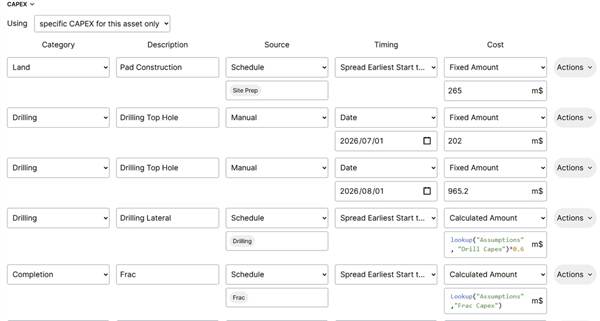
Asset-specific capex can be used for situations like importing specific well AFEs (moving off of a capex model as a well is developed) or importing capex associated with a specific facility.
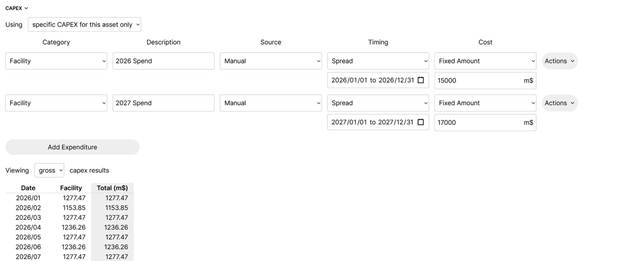
As part of this change Planner 3.0 also adds an option to spread manual capex across a date range. Often when modeling facility capex, annual amounts are provided but expected to be spread over the year.
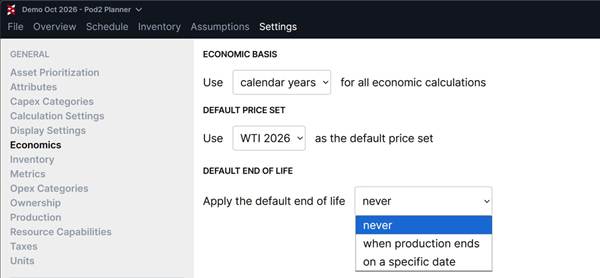
Planner 3.0 also introduces a new "End of Life" capex source option. This represents capex that should be applied whenever the end of life is reached for an asset. For example, this can be used to handle plug and abandonment capex. You can set a default end of life across your plan:
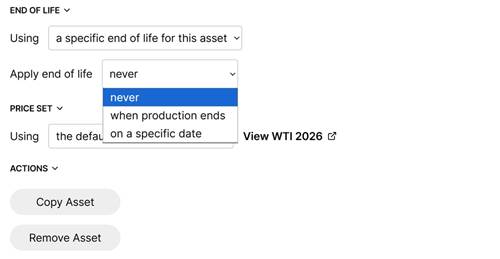
You can specify the end of life per asset:
📌 Metric Pinning and Resource Ordering
For plans with many resources or metrics, it can be hard to see specific metrics while you're moving activities around on your schedule. In Planner 3.0, you can pin specific metrics so they're always shown, no matter where you are in the resource view. This should make it easier to understand the impact of changes as you update the schedule or re-prioritize development.
Also new to Planner 3.0 is the option to reorder resources on the schedule visualization. Previously the order of resource capabilities could be changed, but sometimes you might want to move certain resources further down in the list or group specific resources together (even though they have different capabilities). Like metric pinning, this should help you to focus on what's important as you make changes to your schedule.
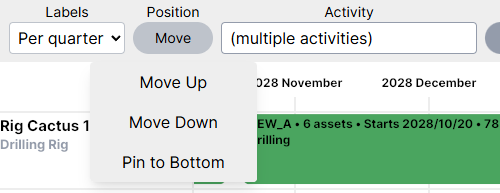
Both metric pinning and resource ordering can be accessed by selecting a metric or resource and selecting "Move". You can also access metric customization like this for metrics in the Settings tab under "Metrics".
🔀 Ownership Reversions
Planner 3.0 adds support for ownership reversions! This is really important for anyone with interests changing over time, and can have a significant impact on net production or economics. You can specify reversions per asset:
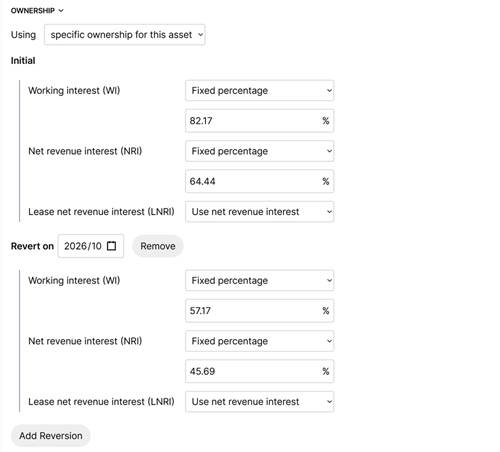
Date reversions are supported initially, and we plan to extend this to other kinds of reversions as well. As mentioned previously, ownership interests including date reversions can also be imported from Excel or ARIES.
🚛 Mobilization Tables
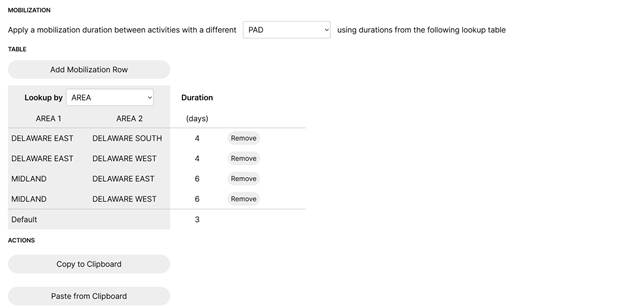
Do you want to model rig mobilization with more granularity? You can now use tables to define various mob durations when resources move from one area to another. This adds a higher level of accuracy to forecasts where mob times vary drastically from one move to the next, while keeping it easy to manage in a simple table.
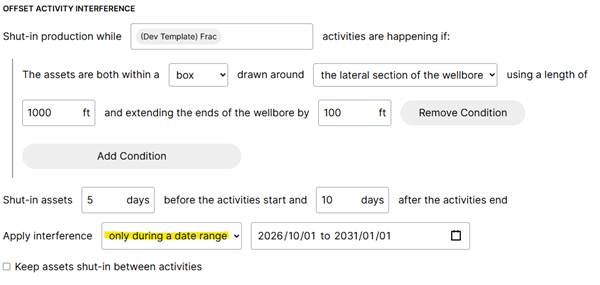
📅 Date Ranges for SIMOPs and Activity Interference
In Planner 3.0, you can limit SIMOPs restrictions and activity interference to certain date ranges. For example, if you'd like to ignore offset frac interference in the past then you can use a future date range. Similarly it can be be useful to limit SIMOPs restrictions to avoid the long-term where inventory locations are less certain.